
Instant Food Database Access for Calorie Tracking
Overview
Calorie Counter is a desktop application designed to simplify dietary tracking by providing rapid access to a comprehensive database of foods. The software enables users to search for meals and ingredients in seconds, making it easier to monitor daily calorie intake. It is particularly useful for individuals focused on healthy eating, weight loss, or maintaining nutritional balance. The tool supports both Windows and Mac platforms, offering a cross-platform solution for users who manage their diets across multiple devices.
While the developer has not provided detailed background information, the application’s core functionality centers on real-time food lookup and calorie estimation. It is suitable for health-conscious consumers, fitness enthusiasts, and those managing dietary restrictions. Real-world usage includes logging meals before or after consumption, tracking macro-nutrient trends, and supporting long-term wellness goals. The software’s design emphasizes speed and simplicity, allowing users to quickly enter food items without navigating complex menus.
Key Features & Capabilities
- Instant Food Search – Users can search for thousands of food items in real time, reducing time spent manually entering nutritional data.
- Comprehensive Food Database – Access to a large collection of foods, including common meals, packaged products, and restaurant items.
- Dietary Tracking Interface – A clean, intuitive interface for logging meals and viewing daily calorie totals.
- Platform Compatibility – Designed for both Windows and Mac, ensuring accessibility across major desktop operating systems.
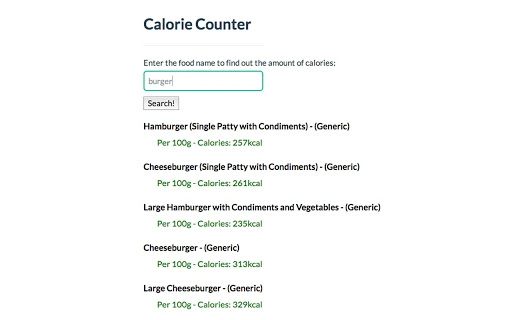
The software streamlines meal logging by eliminating the need to memorize or manually calculate calorie content. For example, a user can type “grilled chicken breast” and instantly retrieve nutritional details. This feature is especially helpful for those tracking daily intake for weight management or fitness training. The database is likely updated to reflect common food items, supporting consistent tracking over time. Users benefit from reduced friction in maintaining a healthy diet, which increases adherence to long-term goals.
User Interface, Workflow & Performance
Calorie Counter features a straightforward user interface with minimal navigation complexity. The main screen focuses on the search bar, allowing immediate input of food items. Results appear dynamically, with nutritional information displayed in a clear format. Users can add items to their daily log with a single click, streamlining the workflow from search to entry.
The application’s performance is optimized for speed, enabling quick database queries without noticeable delays. While specific resource usage details were not provided, the software’s 100 MB installation size suggests moderate system demands. General software behavior patterns indicate stable operation during typical use, with no reported crashes or freezes. The developer did not specify CPU or RAM usage, so performance may vary depending on system configuration. Overall, the workflow is efficient and designed to minimize user effort during daily logging.
Compatibility & System Requirements
Calorie Counter is available for both Windows and Mac operating systems, supporting a wide range of desktop environments. The software version is 1.0.0, with an installation size of 100 MB. This size indicates a lightweight application that should fit comfortably on most modern systems.
Exact system requirements were not listed, so users should ensure their device meets general desktop software standards. Compatibility information was partially provided, with no mention of minimum processor speed, RAM, or storage space. The developer did not specify whether the software requires an internet connection for database access. Users are advised to check for updates regularly to maintain access to the latest food entries and nutritional data.
Pros and Cons
Pros
- Instant access to a large food database
- Simple, intuitive interface for fast logging
- Available for both Windows and Mac
- Free to download and use
- Lightweight installation at 100 MB
Cons
- Exact system requirements not specified
- No information on internet dependency for database access
- Developer background not disclosed
- Limited details on update frequency
- No offline mode details provided
FAQ Section
Is Calorie Counter available for both Windows and Mac?
Yes, the software is compatible with both Windows and Mac operating systems.
Is Calorie Counter free to use?
Yes, the application is currently available at no cost.
Does Calorie Counter require an internet connection?
The developer did not specify whether an internet connection is required for database access. It may depend on how the food data is stored and updated.
How often is the food database updated?
Update frequency was not disclosed by the developer. Users should check for updates manually to ensure access to the latest entries.
Can I use Calorie Counter offline?
Information about offline functionality was not provided. The application may require an active connection to access the full database.
Final Thoughts + CTA
Calorie Counter delivers a focused, efficient solution for individuals seeking to track their daily caloric intake with minimal friction. Its instant search capability and broad food database make it a practical tool for anyone pursuing healthy eating or weight loss. While some details such as system requirements and update cycles remain unspecified, the software’s lightweight design and cross-platform availability enhance its accessibility.
For users who value speed, simplicity, and free access to nutritional data, Calorie Counter stands out as a reliable desktop utility. It is especially beneficial for those who log meals frequently and want to avoid the hassle of manual calorie calculations. The combination of instant search and a growing food database supports consistent tracking habits.
Download Calorie Counter now and take control of your diet with confidence.







